Tuesday, December 12, 2023

Working old software is underappreciated


Working old software is underappreciated


A decision all programmers have faced is whether or not to replace old working software. 

There are usually good reasons to replace but especially extensibility.  Old code is brittle 

and often contains parts nobody understands.   Sometimes it contains inefficiencies for modern

 hardware and you wouldn’t design it that way now.


My experience is that for most programmers, they err on the side of rewriting when they shouldn’t.

And this is not a small effect: they err a lot in that direction.  I am no exception to this.  

 I think there are many reasons for this systematic err, but one is programmer personality…

 we like to create.  Better to build a new creative building than to paint an old one that is boring.   

But I think the big reason is we tend to underrate the best quality of old software: it works.


A key invisible thing about old software is that it has survived many battles 

nobody remembers and is empirically robust to many situations.  

 The key is that old software has survived under selection pressure. 

As this famous Ape 2.0 has shown, this is VERY powerful:
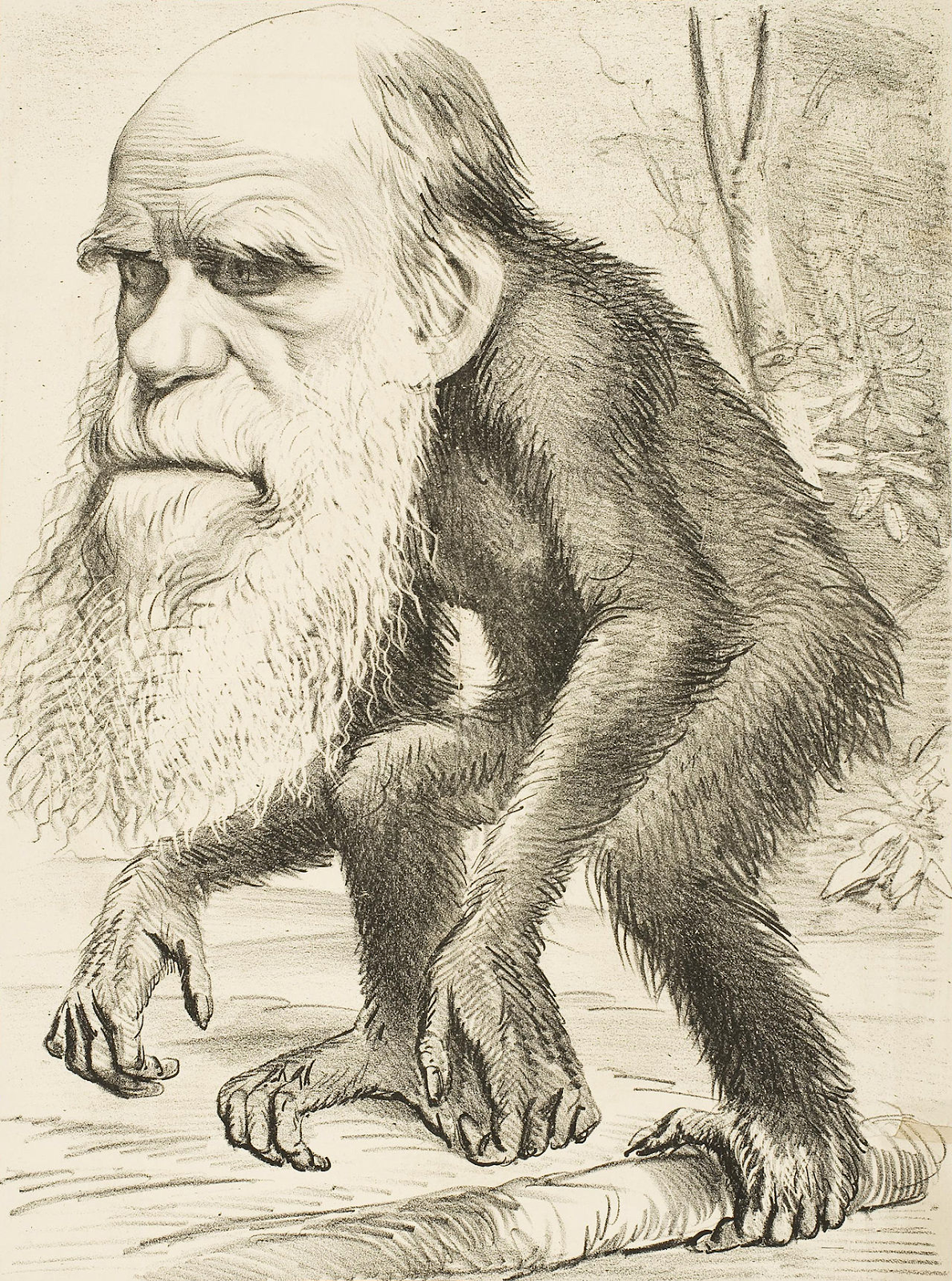


 If you start from scratch, it may take years to develop that intrinsic robustness.   

Being more wary of deleting old code is a cousin of this maxim:


 “Don't ever take a fence down until you know the reason it was put up” (Chesterton)


Let’s go to an Oryx and Crake style genetic engineering problem if you had the DNA 

skills to design creatures.   Should you improve on this ridiculous 

poorly designed creature (Photo:Samuel Blanc):
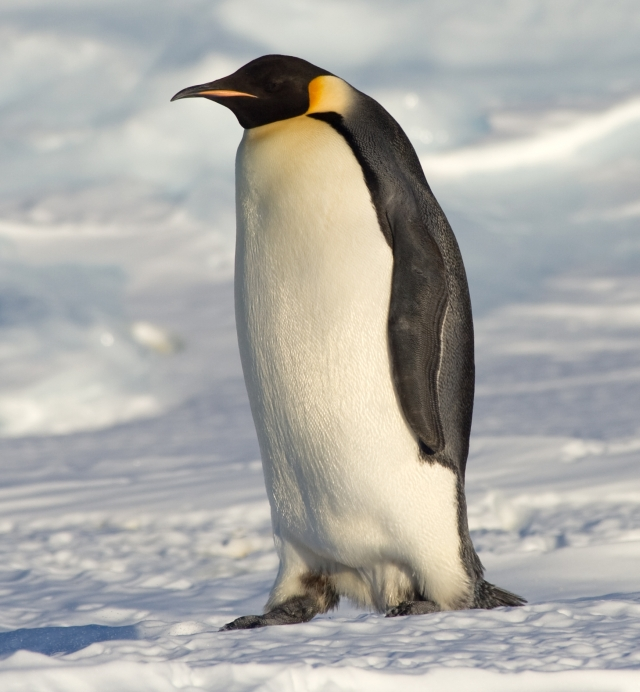
I mean it has wings but can’t fly?!   Some users may need that feature.  

 It swims but has feathers than can get wet?!   Why not make it like a dolphin.  

 Sure that creature might be better than version 1.0, but it might need many 

mods as it “dies” in various ways.


Another poorly designed creature that should be redesigned?   No brains and all spikes:
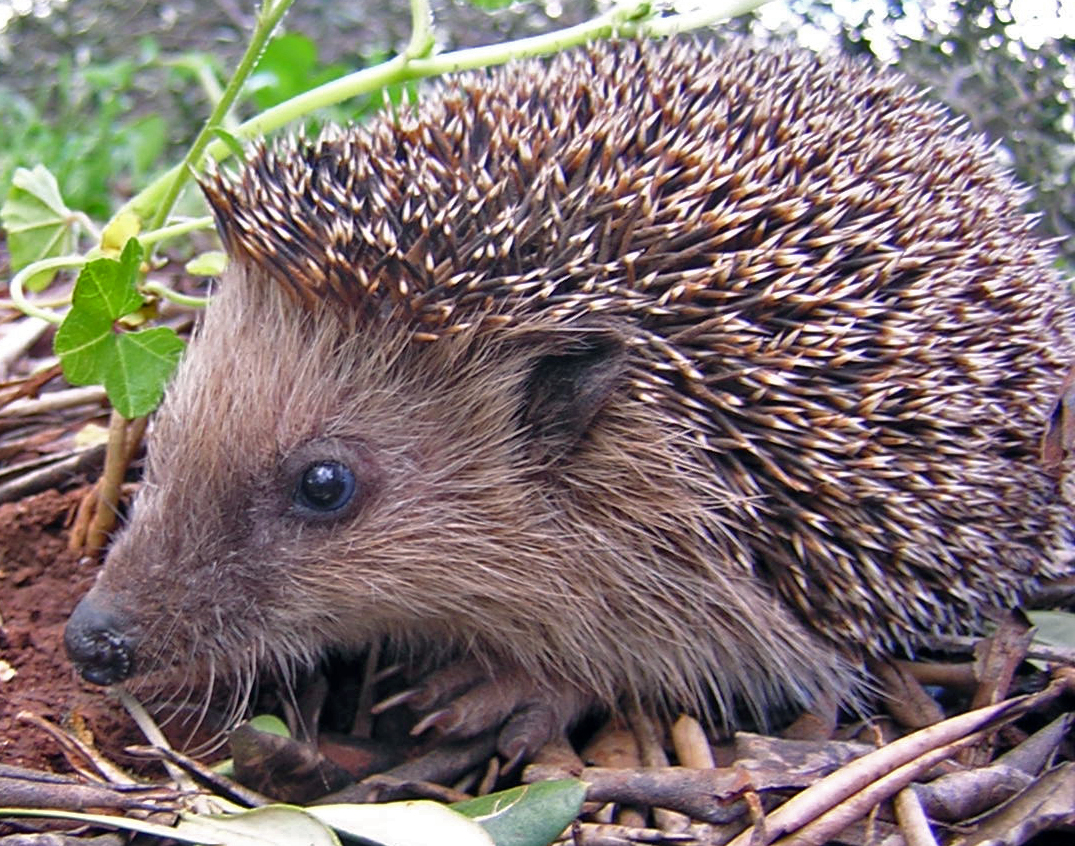

Make the brain bigger.  Make the legs longer.  Give it thumbs.


Having had a hedgehog as a pet, I am the first to admit they are ridiculous.  

But the hedgehog has needed little revision for 15 million years!


While the penguin and hedgehog are both very robust, if they traded continents both 

would probably die.   So sometimes the environment changes enough that starting from 

scratch is a good thing.   But never underestimate all the hidden talents in an 

evolved creature or piece of software!  Please read more about it in my new book:



Tuesday, June 7, 2022

Hello World for Smart Lights


I got three Philips Hue bulbs and a Philips Hue Bridge (basically a hub you need to attach to your router) and tried various Python interfaces to control them.  I found one I really like and here is a hello world:


(Yes, you could in theory run that program and control my bridge, but part of the Philips security is you need to be on the same network as the bridge)

Each bulb is set using HSB system that has (256^2, 256, 256) settings, and the program above cycles through the hues -- here are four stops along there:

I  found this to be quite fun and am thinking if I ever teach Intro Programming again I will base it on the Internet of Things-- the execution of commands becomes quite concrete!


Tuesday, February 1, 2022

Direct Light 3: what goes in the direct light function?

Part 1 of 3

Part 2 of 3


 In the previous two posts I discussed why one might want direct lighting as a separate computation.  But what goes in that function?

If we are just sampling a single light, then we need to bite the bullet and do a Monte Carlo integration with actual probability density functions.  These functions can either be defined over the area of the light, or the angles the light is seen through.  You can dive into all of that later-- it looks intimidating but is mainly like learning anything new with bad terminology and symbols-- just eat the pain :)

But for now, we can do it the easiest way possible and "just take my word for it".  After you have implemented this once, the written descriptions will make more sense.

First, pick a random point uniformly on the surface of the light.  Chapter 16 of this book will show you how to do this for various shapes.

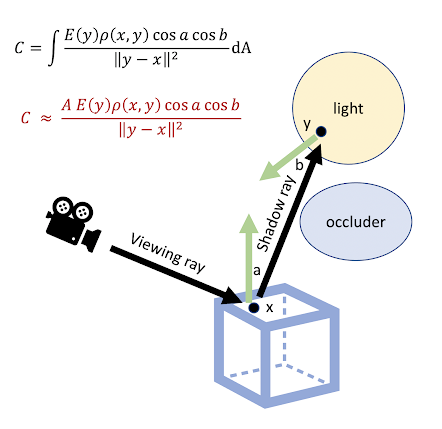
The magic integral you need to solve, often referred to as the "rendering equation" is this:


 The key formula you evaluate is in red.  Area is the total area of the light.  The "rho" is the BRDF and for a diffuse (matte) surface that is "rho = reflectance / pi".   So pick a random point y uniformly on the light, see if x can "see" y by tracing a "shadow" ray from x to y (or vice-versa).  That's it!  It will be noisy for spherical lights (half the time, y is on the back and so will be shadowed, and the cosb will vary a lot), but it will work well for polygonal lights.  Worry about that later-- just get it to work.

What about multiple lights.  Three choices:

  1. do one of these computations for each light and add them
  2. pick one of the N lights at random, do the computation for that one light, and multiply by N
  3. implement reservoir sampling like all the cool kids do (it is a new technique and works really well)

I endorse option 2 as your first step.  


Monday, January 31, 2022

Direct Light 2: integrating shadow rays into a path tracer

Part 1 of 3

Part 3 of 3


In my last post, I talked about using shadow rays to sample a light source directly.  Here is our old lovely but noisy path tracer:

vec3 ray_color(ray r)
  if (r hits an object)
       r = ray(hitpoint, generate a scattered  direction from the surface)
       return emitted(hitpoint) + reflectance*ray_color(r)
   else
        return background_color(r)

This works great provided the light emitting objects are big, but otherwise we get a lot of noise.  We also are crossing our fingers we don't get an infinite recursion.


Let's assume we have a magic function direct_light(vec3 p, reflectance_info ref).   Can we just do this to the return line above:

      return emitted(hitpoint) + direct(hitpont, ref_info) +reflectance*ray_color(r)

NOPE!  That would double count direct because that sacttered ray r might hit the light and get the emitted part.  So this is better:

     return direct(hitpont, ref_info) +reflectance*ray_color(r)

 BUT, if you see the light source in the picture, it will be black!  

And before we fix that, another problem is that if the surface is a perfect mirror, the direct lighting itself will be too noisy because only one point on the light matters.

So we need something like a "sees the light" flag on a ray.

vec3 ray_color(ray r)
   vec3 color = (0, 0, 0)
  if (r hits an object)
       if (r.should_see_lights)
            color +=  emitted(hitpoint)
            r = ray(hitpoint, generate a scattered  direction from the surface, should_r_see_lights_flag)
            if (r.should_see_light)
                    color += reflectance*ray_color(r)
            else
                    color += direct(hitpoint, ref_info) +reflectance*ray_color(r)
   else
        color += background_color(r)
  return color

Man that is pretty ugly!  But I don't know a much better way.  Be sure to set the viewing ray flags to "should_see_light = true".

 Are we done?  No.  For perfect mirrors, should_see_lights scattered rays should be set true.  For diffuse reflectors, false.  For glossy objects, it depends on the size of the light source.  Here, a lovely technique from Eric Veach is often used.   I would go with the "balance heuristic"-- it is easiest.  There is a wonderful figure from the paper that shows why this technique is needed:


So are we done?   No, there is one more issue.  Does the background "emit" light?  Isn't it a light source.  The answer is you can do it either way.  But if it is a light source, and you can hit it, we can get rid of the   if (r hits an object)  branch-- the background is always hit!  But if it has infinite radius where is the hitpoint?  I would say these design decisions are not obvious and I am on the fence even after trying all of them.

Next time: what goes in here: direct(hitpoint, ref_info)


Sunday, January 30, 2022

What is direct lighting (next event estimation) in a ray tracer? Part 1 of 3

Part 2 of 3

Part 3 of 3

In Ray Tracing in One Weekend, we took a very brute force and we hope intuitive approach that didn't use "shadow rays", or as some on the whipper-snappers say "next event estimation".  Instead we scattered rays and they got "direct light" (light that is emitted by a radiant object, hits one surface, and is scattered to the camera) implicitly by having a ray randomly scatter and happen to hit to hit the light source.

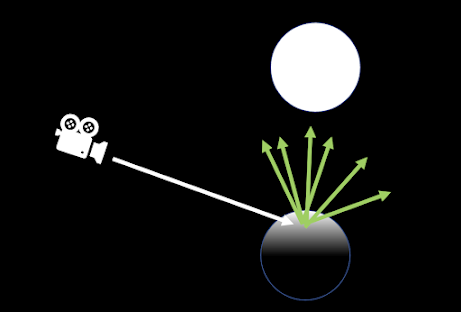
Direct light with shadow rays can make some scenes much more efficient, and 99%+ of production ray tracers use shadow rays.  Let's look at a simple scene where the only thing in the world is two spheres, one diffusely reflective with reflectivity R, and one that absorbs all light but emits light uniformly in all directions, so it looks white.  So if we render just the light source, let's assume it is color RGB = (2,2,2).   (for now, assume RGB=(1,1,1) is white on the screen, and anything above (1,1,1) "burns out" to also be white-- this is a tone mapping issue which is its own field of study!  But we will just truncate above 1 for now which is the best tone mapping technique when measured by quality over effort :) ).

To color a pixel in the "brute force path tracer" paradigm, the color of an object is:

color = reflectivity * weighted_average(color coming into surface)

The weighted average says not all directions are created equal-- some influence the surface color more than others.  We can approximate that weighted average above by taking some random rays, weighting them, and averaging them:


for the six rays above, the weighted average is 


color = reflectivity*(w1*(0,0,0) + w2*(0,0,0) w3*(2,2,2) + w4*(2,2,2) w5*(0,0,0) + w6*(0,0,0))) / (w1+w2+w3+w4+w5+w6)

So reflectivity*(2/3, 2/3, 2.3) so a very light color.  If we had happened to have an extra ray randomly hit it would be reflectivity*(1,1,1) and if one more missed reflectivity*(1/3, 1/3, 1/3)

So we see why there is noise in ray tracings but also why the bottom of the sphere is black-- no scattered rays can hit the light. 

A key thing is this sort of Monte Carlo is any distribution of rays can be used, and any weighting functions can be used, and the picture will usually be "reasonable".  Surfaces attenuate light (with reflectivity-- their "color") and they preferentially average some directions over others.

Commonly, we will just make all the weights one, and make the ray directions "appropriate" for the surface type (like for a mirror, only one direction is chosen.  

The above is a perfectly reasonable way to compute shading from a light.   However, it gets very noisy for a small light (or more precisely, a light that subtends a small angle, light our biggest light, the Sun).

A completely different way to compute direct lighting is to view all those "missed" rays wasted, and only send rays that don't yield a zero contribution.  But to do that, we need to somehow figure out the weighting so that we get the same answer.

What we do there is just send rays toward the light source, and count the ones that hit (if they hit some other object, like a bird between the shaded sphere and the light, it's a zero).

So the rays are all random, but also only in directions toward the light.  Now the magic formula is

 color = MAGICCONSTANT*reflectivity*(w1*(0,0,0) + w2*(0,0,0) w3*(2,2,2) + w4*(2,2,2) w5*(0,0,0) + w6*(0,0,0))) / (w1+w2+w3+w4+w5+w6)

 What is different is:

1. what directions are chosen?

2. what are the weights?

3. What is the MAGICCONSTANT?     // will depend on the geometry for that specific point-- like it will have some distance squared attenuation in it

The place where we have freedom is 1.  Choose some way to sample directions toward the sphere.  For example, pick random points on the sphere and send rays to them.  Then 2 and 3 will be math.  The bad news is that the math is "advanced calculus" and looks intimidating because of the formulas and because 3D actually is confusing.  The good news is that that advanced calc can be done methodically.  More on that in a future post.

But great cheat!  Just use some common sense for guesses on 2 and 3 (checking the quality of your guesses with the more brute force technique) and your pictures will look pretty reasonable!  That is the beauty of weighted averages.


Thursday, December 30, 2021

What is an "uber shader"?

 I am no expert on "uber shaders", but I am a fan.  These did not make much sense to me until recently.  First let's unpack the term a little bit.  The term "shader" in graphics has become almost meaningless.  To a first approximation it means "function".  So a "geometry shader" is a function that modifies geometry.  A "pixel shader" is a function that works on pixels.  In context those terms might mean something more specific.  

So "uber shader" is a general function?  No.

An uber shader is a very specific kind of function: it is one that evaluates a very particular BRDF, usually in the context of a particular rendering API.  The fact that it is a BRDF implies this is a "physically based" shader, so is ironically much more restricted than a general shader.  The "uber" refers to it being the "only material model you will ever need", and I think for most applications, that is true.  The one I have the most familiarity with (the only one I have implemented) is the Autodesk Standard Surface.

First let's get a little history.  Back in ancient times people would classify surfaces as "matte" or "shiny" and you would call a different function for each type of surface.  Every surface would somehow have a name or pointer or whatever to code to call about lighting or rays or whatever.  So they had different behavior.  Here is a typical example of some materials we used in our renderer three decades ago:


But sometime in the late 1990s some movie studios started making a single shader that encompassed all of these as well as some other effects such as retro-reflection and sheen and subsurface scattering.  (I don't know who came up with this idea first, but I think Sing-Choong Foo, one of the BRDF measurement and modeling pioneers that I overlapped with at Cornell, did one at PDI in the late 1990s... this may have been the first... please comment if you know anything about the hisotry which really ought to be documented).

Here is the Autodesk version's conceptual graph of how the shader is composed:


So a bunch of different shaders are added in linear combinations, and the weights may be constant or may be functions.  This is a bit daunting looking.  Let's show how you would make a metal (like copper!):  First set opacity=1, coat=0, metalness=1.   This causes most of the graph to be irrelevant:

Now let's do a diffuse surface.  Opacity=1, coat = 0, metalness=0, specular=0,transmission=0,sheen=0,subsurface=0.  Phew!  Again most of the graph drops away:


So why has this, for the most part, won out over categorical shaders that are different?  Having implemented the above shader along with my colleague and friend Bob Alfieri, I really like it for streamlining software.  Here is your shader black box!   Further, you can point to the external document and get data in that format.  

But I suspect that is not the only reason uber shaders have taken over.  Note that we could have set metalness=0.5 above.  So this thing is half copper metal and half pink diffuse.  Does that make any sense as a physical material?  Probably not.  And isn't the whole point of a BRDF to restrict us to physical materials?  I think such unphysical combinations serve two purposes:

  1. Artistic expression.  We usually do physically-based BRDF as a guide to keeping things plausible and robust.  But an artistic production like a game or movie might look better with nonphysical combinations, so why not expose the knobs!
  2. LOD and antialiasing. A pixel or region of an object may cover more than one material.  So the final pixel color should account for both BRDF.  Combining them in the shading calculation allows sparser sampling.

Finally, graphics needs to be fast both in development and production.  So the compiler ecosystem is here.  I don't know so much about that, which is a credit to the compiler/language people who do :)


.

Friday, August 6, 2021

A call to brute force

 In the writing of the new edition of Marschner's and my graphics text, we tried to add more "basics" on light and material interaction (I don't mean BRDF stuff-- I mean more dielectrics) and more on brute force simulation of light transport.  In the "how would you maximally brute force a ray tracer) we wrote this:


Basically, it's just a path tracer run with *only* smooth dielectrics and Beer's Law.  If you model a scene with all the microgeometry and allow some of it to absorb, you can get colored paint with a rough surface.  Here is an few  figures from my thesis (and it was an old idea then!):


Doing the brute force path tracing is slow and dealing with the micro-particles is slow, so we invent BRDFs and other bulk properties, but that is all for efficiency.  When we wrote this, which is a classic treatment people use in the classroom all the time, we were thinking it was just for education and  for reference solutions (like Eugene d'Eon has done for skin for example), but since Monte Carlo path tracing is almost infinitely parallel, why not do this on a huge crowd sourced network of computers (in the spirit folding@home)?

I am thinking for images of ordinary things whose microgeometry would be easy to model.  For example a lamp shade with a white lining:


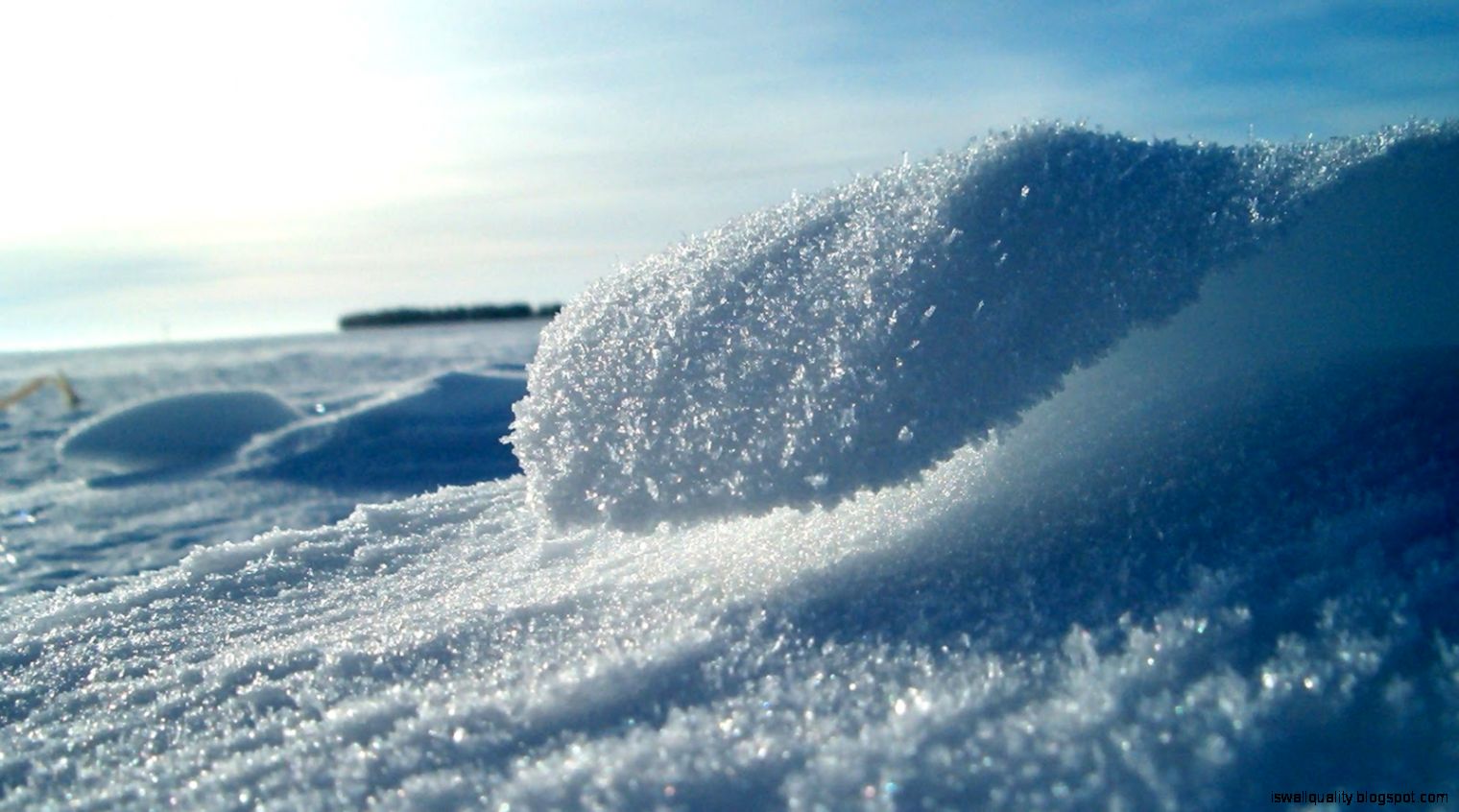
Another example of something very complex visually that might be modeled procedurally (https://iswallquality.blogspot.com/2016/07/fresh-snow-close-up-wallpaper-hd.html):


Or a glass of beer or... (on and on).

So what would be needed:

  1. some base path tracer with a procedural model we could all install and run
  2. some centralized job coordination server that doled out random seeds and combined results 
  3. an army of nerds willing to do this with idle cycles rather than coin mining

I don't have the systems chops to know how to best do this.  Anyone?   I will take the discussion to twitter!


Wednesday, April 14, 2021

I am not a believer in trying to learn two things at once.

 I just spent this week learning to program with OpenGL in Python using the fabulous PyOpenGL.  I was barely able to do it.  I have written a whole textbook on computer graphics and it derives the OpenGL matrix stack and the viewing model conceptually.  The OpenGL graphics pipeline model, if I recall accurately, I was also barely able to learn!  I think there is a zero percent chance I could learn the ins and outs of calls to and behavior of PyOpenGL and the underlying conceptual model.

One reason I am pretty sure of that is that I once tried learning TensorFlow, Python, and neural nets.  It did not go well.  Once I was comfortable with Python and kind of understood neural nets, I tried again (about a year later) with PyTorch.  It was not pretty.  Finally, I implemented a neural net in C, then one in Python, from scratch.  It was painful, but I made it.  Barely.  (And thanks to some advice from Shalini Gupta, Rajesh Sharma, and Hector Lee).  Then used PyTorch and  managed to train a network from scratch.   Again, barely.

My empirical experience is that it takes a focused and concerted to learn anything really new.   And if it were any harder, I don't think I could do it.  And if I am trying to learn two things at once (particularly an API and the concepts/algorithms that the API is abstracting for me) then forget it.

Conclusion: I should never try to learn two things at once.  If you have trouble with that, break it down.  It may seem like it takes longer, but nothing is longer than never learning it!

Corollary:  when you see somebody quickly picking up packages and wondering why you don't, maybe you are just like me, or maybe they are really something special.  Either way, if you develop competence in a technical area, you are in the most fortunate 0.1% of humans, and take a bow.  You need to find a way that works for you.

Monday, December 7, 2020

Debugging refraction in a ray tracer

 Almost everybody has trouble with getting refraction right in a ray tracer.  I have a previous blog post on debugging refraction direction if you support boxes.  But usually your first ray tracers just supports spheres and when the picture just looks wrong and/or is black, what do you do?

So if you are more disciplined than I usually am, write a visualization tool that shows you in 3D the rays generated for a given pixel and you will often see what the problem is.  Like this super cool program for example.

But if you are a stone age person like me:

Pebbles Flintstone -- Evangelist! 

Then you have exactly two debugging tools: 1) printf() and 2) output various frame buffers.  For debugging refraction, I like #1.  First, create some model where you know exactly what the behavior of a ray and its descendants should be.  Real glass reflects and refracts.  Let's get refraction right.  So comment out any possibility of reflection.  A ray goes in, and refracts (or if that is impossible, prints that).

Now let's set up the simplest ray and single sphere possible.  The one I usually use is this:

 The viewing ray A from the camera starts at the eye and goes straight long the minus Z axis.  I assume here it is a unit length vector but it may not be depending on how you generate them.


How do you generate that ray?  You could hard-code it, or you could instrument your program to take a parameter or command line argument or whatever for which pixel to trace (like -x 250 -y 300 or whatever).  If you do that you may need to be careful to get the exact center-- like what are the pixel offsets?   That is why I usually just hard code it.  Then let the program recurse and make sure that you get:


A hits at Q which is point (0,0,1)

The surface normal vector at Q is (0,0,1)

The ray is refracted to create B with origin Q and direction (0,0,-1)

B hits at R is is point (0,0,-1)

The surface normal at R is (0,0,-1)

The ray is refracted to create C with origin R and direction (0,0,-1)

The ray C goes and computes a color H of the background in that direction. 

The recursion returns that color H all the way to the original caller

That will find 99% of bugs in my experience


Tuesday, November 17, 2020

How to write a paper when you suck at writing

Most papers are bad and almost unintelligible.  Most of my papers are bad and almost unintelligible.  The ubiquity of this is evidence that writing good papers must be hard.  So what am I to do about this if I suck at writing?  This is not false modesty; I do suck at writing.  But I am an engineer, so there must be a way to apply KISS here.  KISS works.  This blog post describes my current methodology to produce a paper.  My version of the famous Elmore Leonard quote is:

Concentrate on the parts most readers actually look at.

Your title, figures, and their captions should work as a stand-alone unit.  Write/make these first.  Doing this in the form of a Powerpoint presentation is a good method.  Explaining your paper to a friend using the white board and then photographing what evolves under Q&A is a good method.  Then ruthlessly edit.  Ask yourself: what is this figure conveying?  Each idea should have exactly one figure, and you should know exactly what each of those ideas is.

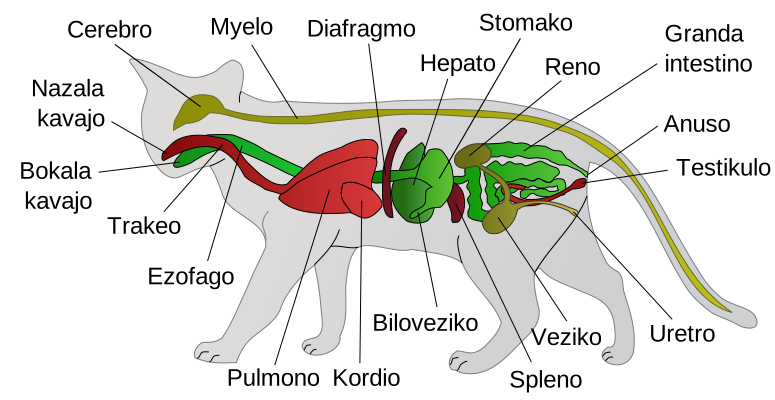
Let's do an example.  Suppose I were to write a paper on why it is better to feed your cats in the evening than in the morning.  First, you should have a figure on what is a cat, along with a caption.


File:Scheme cat anatomy-io.svg - Wikimedia Commons
This is a cat


Don't assume your reader knows much of anything (see caveat at end of article).  Now the figure above has details that are not relevant to the point, so you probably need a different one.  Getting exactly the right figure is an iterative process.

If my key reason for not feeding the cat is that in the morning they will wake me earlier each day, I need some figure related to that, such as:

Does Your Cat Wake You Up? - Cat Tree UK
The problem with a 6am feeding, is the cat starts thinking about it before 6am


(credit cattree)

Finally, you will need a figure that gets across the idea that feeding the cat in the evening works.  

https://img.buzzfeed.com/buzzfeed-static/static/2014-12/24/13/enhanced/webdr12/enhanced-buzz-20034-1419447316-20.jpg?downsize=600:*&output-format=auto&output-quality=auto
Feeding the cat before bedtime is effective

(credit buzzfeed)


So you now have an argument sequence where the reader can "get" the point of your paper.  Your actual paragraphs should make your case more airtight, but 90% of the battle is getting the reader to understand what you are even talking about.  "What is this?" should never be a struggle, but usually is.

For the paper writing itself, write to the figures.  First, add paragraphs that speak to the point of the figure and reference it.  Then, add paragraphs as needed to make the point convincing.  Each paragraph should have a definite purpose, and you should be able to say explicitly what that is.  The results section should convince the reader that, for example, cats do in fact behave better when fed in the evening.

Now, there is a caveat for peer-reviewed papers.  Reviewers often think that if something is clear, it must not be academic.  They will want you to omit the first figure.  This is an example of "you can't fight city hall".  But make things as clear as they will let you.   If this irritates you, suck it up, and do writing any way you want to in books, blog posts, and emerging forms of expression that you have full control over.

So, in summary, make the figures the skeleton of the paper and do them first.  An important point that applies to more than this topic: develop your own process that works for YOU; mine may be that process for you, and may not.  Final note-- I feed my cats in the morning.


Wednesday, August 19, 2020

Grabbing a web CSV file


I am tutoring an undergrad non-CS person on Python and we tried to graph some online data.  This turned out to be pretty painful to get to work just because of versioning and encodings and my own lack of Python experience.  But in the end it was super-smooth code because Python packages rule.

Here it is.  The loop over counter is super kludgy.  If you use this, improve that ;)

import csv
import urllib
import codecs
import matplotlib.pyplot as plt

url = 'https://data.london.gov.uk/download/historic-census-population/2c7867e5-3682-4fdd-8b9d-c63e289b92a6/census-historic-population-borough.csv'

response = urllib.request.urlopen(url)
cr = csv.reader( codecs.iterdecode(response, 'utf-8') )

counter=0

x = []
y = []

for row in cr:
    if counter == 3:
        for j in range(2,len(row)):
            x.append(1801+10*j)
            y.append(int(row[j]))
        plt.plot(x, y)
        plt.title(row[1])
        plt.xlabel('year')
        plt.ylabel('population')
        plt.show()
        print(row[1])
    counter=counter + 1


Thursday, July 2, 2020

Warping samples paper at rendering symposium


Here is a paper at EGSR being presented tomorrow at the time of this writing.

It deals with sampling lights.  The paper is pretty daunting because it has some curve fitting which always looks complicated and it works on manifolds so there are Jacobians running around.   But the basic ideas are less scary than the algebra implies and is clean in code.  I will cover a key part of it in a simple case.

If you are doing direct lighting from a rectangular light source, this is the typical Monte Carlo code for shading a point p:

pick point q on light with PDF p(q) = pdf_q
if (not_shadowed(p, q))
    d = unit_vector(q-p)
    light += BRDF * dot(d, n_p) * dot(-d, n_q) * emitted(q) / (distance_squared(p,q) * pdf_q)

Most renderings, or most of mine anyway, pick the point uniformly on the rectangle so pdf_q = 1/area.   There are more sophisticated methods that try to pick the PDF intelligently.  This is hard in practice.  See the paper for some references to cool work.

But we can also just try to make it one or two steps better than constant PDF.  The first obvious candidate is PDF that is bilinear which just computes this at each corner:

weight = BRDF * dot(d_corner, n_p) * dot(-d, n_corner) * emitted(corner) / distance_squared(p,corner)

The PDF gets 4 weights and needs to be normalized so it a PDF, and you need to pick points from it.  This is an algebraic book-keeping job.  But not bad (see the paper!).  The disruption to the code is no big deal.   For my particular C++ implementation here is my sampling code (which is a port of David Hart's shadertoy-- see that for the code in action-- this is just to show you it's no big deal)

// generate a sample from a bilinear set of weights
vec2 sample_quad(const vec2& uv, const vec4& w) {
    vec2 newuv;
    real u = pdf_u(uv.x(), w);
    real v = pdf_v(uv.y(), u, w);
    return vec2(u,v);
} 


// helper functions
inline real pdf_u(real r, const vec4& w) {
    real A = w.z() + w.w() - w.y() - w.x();
    real B = 2.*(w.y()+w.x());
    real C = -(w.x() + w.y() + w.z() + w.w())*r;
    return solve_quadratic(A,B,C);
}

inline real pdf_v(real r, real u, const vec4& w) {
    real A = (1.-u)*w.y() + u*w.w() - (1.-u)*w.x() - u*w.z();
    real B = 2.*(1.-u)*w.x() + 2.*u*w.z();
    real C = -((1.-u)*w.y() + u*w.w() + (1.-u)*w.x() + u*w.z())*r;
    return solve_quadratic(A,B,C);
}


// evaluate the PDF
inline real eval_quad_pdf(const  vec2& uv, const vec4& w ) {
    return 4.0 *
        ( w.x() * (1.0 - uv.x()) * (1. - uv.y())
        + w.y() * (1.0 - uv.x()) * uv.y()
        + w.z() * uv.x()        * (1. - uv.y())
        + w.w() * uv.x()        * uv.y()
    ) / (w.x() + w.y() + w.z() + w.w());
}


The same basic approach works on triangles and works if you sample in a solid angle space.  I hope you try it!


Friday, April 24, 2020

Deugging refraction in a sphere


Here is a setup to help debugging refraction using a sphere and a particular ray.  I have do track single rays like this every time I implement refraction.   Here is the setup:

So let's put a sphere of radius 1 the with center (0,0,0).  Now all of the action is in XY so I will leave off the Zs.   First, what is A?

If it is to hit where the surface of the sphere is at 45 degrees, it has to have y component cos(45) = sqrt(2)/2 .  So the origin of the ray should be o = (-something, sqrt(2)/2).  And v = (1, 0).  B, the reflected direction should have origin (-sqrt(2)/2, sqrt(2)/2) and direction (0,1).

What about C?  It has origin  (-sqrt(2)/2, sqrt(2)/2) and direction (1+sqrt(2)/2, -sqrt(2)/2) which has a length of about 1.84776.  So C = (0.9239, -0.3827) approximately.

But what refractive index produces such a C?   We an see that two of the sides have length 1, so the two angles are the same, and we can see that sin(theta) = (sqrt(2)/2) / 1.8776 = 0.38268.  So the refractive index must be the ratio of that ans sin(45).  So refractive_index = 1.8478.

So what is D?  By symmetry it must leave at 45 degrees so D = (1, -1) / sqrt(2).

And finally E reflects across the X axis and E  = (-0.9239, -0.3827) approximately


Friday, March 13, 2020

Fresnel Equations, Schlick Approximation, Metals, and Dielectrics

If you look at a renderer you will probably see some references to "Schlick" and "Fresnel" and see some 5th order polynomial equations.  This is all about smooth metals and "dielectrics".

You will notice that the reflectivity of smooth surfaces vary with angle.  This is especially easy to see on water:

Three Worlds.jpgNote how the reflectivity increases as the angle of the viewer increases as the incident angle of the viewing direction to the normal increases.   Work by Escher.

The fraction of how much light is transmitted and how much is reflected adds to one.  This is true tracing the light in either direction:

Left: the light hitting the water divides between reflected and refracted based on angle (for this particular one it is 23% reflected).  Right: the eye sees 77% of whatever color comes from below the water and 23% of whatever color comes from above the water.


So in a ray tracer we would have the color of the ray be

color = 0.77*color(refracted_ray) + 0.23*color(reflected_ray)

But how do we compute those reflected and refracted constants?

These are given by the Fresnel Equations.  For a non-metal like water, all that you need for them is the refractive index of the material.  Back in the dark ages, I was very excited about these equations and used them in my ray tracer.  Here they are from that wikipedia page:


Here R is the reflectance, theta is the angle to the normal of the incident direction, n1 is the refractive index of the material the incident light is in, and n2 is the refractive index of the material the light is going into.  But there are two of them?!  One is for one type of polarization, and one is for the other.  The "types" are relative to the surface normal.  This is a cool topic but we would need would delve into some pretty serious optics we wont use (though many applications do where optical accuracy is needed and Alexander Wilkie has been doing great work in that area).  So what if I don't have polarization in my ray tracer.  I used to just average them:

R = (R_s + R_p) /2

So how do those look?  Here is from that same wikipedia page as above:


 Well there are some cool things there.  Especially that R_p goes to zero for one angle.  This is Brewster's Angle and why I have polarized sun glasses-- so I can get x-ray vision into water!  But I wont simulate that in a ray tracer.

So what does R = (R_s + R_p) /2 look like for the example above.  I'll type it into grapher on my mac, where x is in theta_i in radians:


Wow that is certainly a complicated expensive function for such a smooth curve.  The x axis in in radians so 90 degrees is x = PI/2 = 1.57.  So 0 to 1.57 is the interesting part.

Now I ran that code for years.  But Christophe Schlick has some sweet papers in the 1990s about using simple approximations to smooth functions in rendering.  I mean why are we solving the approximate equation (we threw away polarization) with exact, expensive equations??!  His equation for approximate fresnel reflection was almost immediately adopted by all of us.  Here it is from that wikipedia page:

 That R_0 is the reflectance for theta=0, so light going straight at the surface.  That is right where transparent surfaces are most clear.  It is just the big fancy equations above which both collapse to that for theta=0.   If I graph that too for the n=1.5 I get:


 OK that is close!  And a lot easier and cheaper.

So where do you get n1 and n2?   If one of the surfaces is air use 1.0 for that.  From that wikipedia article on refractive index above we have:


When in doubt, use 1.5.

Now what happens if you want the rainbows you can see along edges in glass?  That is dispersion and it is a pain in RGB renderers... you probably need more samples than 3 in color and you need to convert to a spectral renderer.  This has been done a few times (here is a fun one with lovely images) but I wont here!

Note that this same equation is used not only for transparent surfaces but also for the reflective coat of "diffuse-specular" surfaces.  Here is one way to think of these surfaces-- a chunk of glass/plastic/whatever with junk in it:


Note that the *surface* (specular) component is just like glass-- use the Schlick for that!  What refractive index?  When in doubt, 1.5 :)

Now what about metals?  Does the above apply?  No, they are nothing like the Fig 2.11 above.  All the action is at the surface.  But the Fresnel equations are more complex-- literally-- the refractive index of metals is complex!   This is sometimes written as real refractice index and conductivity (the real and imaginary part).

Here are the equations:


Wow.  Those are even worse (with k, the conductivity set to zero, you get the non-conductor ones).  So for some applications, this is needed.  But not for most graphics programs.  I rarely use them.  Note that they are real valued.  So can we use Fresnel?  The answer is yes!   So where do I get n and k?  I implemented them in the dark ages and tried it for a few metals.  Here is one:


That looks like we can probably use the Schlick equations but with different base cases for R, G, B.  So where do we get the normal incident reflectance?  We could by evaluating normal incidence.   But the data isn't widely available and a lot of metals are alloys of unknown composition.  So we make R0 up (like grab them from an image-- it's an RGB color, but be careful about gamma!)

vec3 R0 = (guess by looking)
vec3 R = R0 + (1-R0)*pow(1-cosine,5)

But with RGB not just floats.  This is because the refractive index for metals can vary a lot with wavelength (that is why some metals like gold are colored).

Now most graphics programs have two Schlick Equations running around-- one for dielectrics that are float and set by a refractive index, and one that is RGB and set by an RGB R0. This seems odd at first, because it is, but it makes sense if you go searching for the refractive index of glass, then gold (try it!).

Naty H writes:
I think this is good advice by Naty.

For the curious-- does light refract into metal?  Yes it does, but it gets absorbed quickly.  This is why a gold film is transparent if it is thin enough.   Here is information on refraction for metals (I have never implemented this) using Snell's law:
Thanks to Alain Galvan for pointing out some errors!


Wednesday, October 16, 2019

A reader responds

Hi Pete,

I have some nits with your blog post, in particular two points:

1) ALAN: I found it ironic that you wrote this while you are currently learning something new (neural networks...) while I agree you want to balance learning new things with getting stuff done, I think it’s important to always learn new things.

2) good at one thing vs. multiple. This one struck a chord with me, I think I’m not that good at any one thing: There are people in graphics let alone math with way better math chops than me, same for physics / ME / etc. There are also people with better low level (optimizing code) and high level (software architecture) programming skills than me. I think it is precisely that I am pretty good at multiple different things that has made me successful - most people that are really good at math are terrible programmers, and great coders are often bad at math. I actually think a mixture of skills is super valuable! In games technical artist, or programmers with an eye for art, are super valuable for this same reason.

I think a lot of the advice seemed good and resonated with me, but those two points did not.

Saturday, September 28, 2019

How to succeed as a poor programmer

In a previous post I outlined why programmers should strive to be good at one thing rather than everything.

In this post I discuss how to be an asset to an organization when you are not a good programmer.  First, for the record:

I am a poor programmer.   Ask anyone who has worked on group projects with me.

But the key compensation is I am aware I am a poor programmer.   I do not try to do anything fancy.   I follow some heuristics that keep me productive IMO.   I think these heuristics are in fact good for all programmers, but are essential for those of us in the bottom quartile.

  1. KISS.   Always ask first something the extreme programming movement advocates:  what is the simplest thing that could possibly work?  Try that and if it doesn't work, try the second simplest thing.
  2. YAGNI.   When it comes to features and generality, "You Aint Gonna Need It".
  3. ALAN. Avoid Learning Anything New.   Various languages and environments and tools come and go, and each of them requires learning a new set of facts, practices, and a mentality.   And they will probably go away.   Only learn something new when forced.   In 1990 I learned C++.   In 2015 I learned Python.  Good enough.
  4. Make arrays your goto data structure.   Always ask "how would a FORTRAN programmer do this?".   During the course of your lifetime, you should occasionally use trees, but view them like binge drinking... regular use will damage your liver.
  5. Never pretend you understand something when you don't, and never bluff.  Google first, then ask people for what to read, and finally ask for a tutorial from a colleague.   We are all ignorant about almost all things. 
  6. Be aware that most coding advice is bad.   Think about whether there is empirical evidence that a given piece of advice is true.
  7. Avoid linking to other software unless forced.  It empirically rarely goes well.
  8. Try to develop a comfort zone in some area.   Mine is geometric C++ code that calls random numbers.   Don't try to be an expert in everything or even most things.
Finally, let the computer do the work; Dave Kirk talks about the elegance of brute force (I don't know if it original with him).  This is a cousin of KISS.   Hardware is fast.  Software is hard.   Bask in the miracle of creation in software; you make something with behavior out of bits.   If you are bad at programming, you are still programming, something that very few people can do.

Tuesday, June 4, 2019

How bright is that screen? And how good a light is it?

I have always wanted a "fishtank VR" fake window that is bright enough to light a room.   Everytime a new brighter screen comes out I want to know whether it is bright enough.

Apple just announced a boss 6K screen.   But what caught my eye was this:

"...and can maintain 1,000 nits of full-screen brightness indefinitely."

That is very bright compared to most screens (though not all-- the SIM2 sells one that is about 5X that but it's a small market device at present).   How bright is 1000 nits?

First, let's get some comparisons.   "Nits" is a measure of luminance, which is an objective approximation to "how bright is that".   A good measure if I want a VR window is sky brightness.  Wikipedia has an excellent page on this I grab this table from:


Note that the Apple monitor is almost at the cloudy day luminance (and the SIM2 is at the clear sky luminance).   So we are very close!

Now as a light source one could read by, the *size* of the screen matters.   Both the Apple monitor and the SIM2 monitor are about half a meter in area.   How many *lumens* is the screen?   This is how we measure light bulbs.

This 100 Watt EQ bulb is 1600 lumens.   So that is a decent target for a screen to read by.   So how do we convert a screen of a certain area with a luminance to lumens?   As graphics people let's remember that for a diffuse emitter we know wsomething about luminous exitance (luminous flux):

luminance = luminous exitance  divided by (Pi times Area)

So 1000 = E / (0.5*PI) = E/6 (about).

E is lumens per square meter.   So we want lumens = E*A = 0.5*E = 1000.   So lumens = 2000.   That is about a 100 watt bulb.   So I think you could read by this Apple screen if it's as close as you would keep a reading lamp.   If one of you buys one, let me know if I am right or if I am off by 10X (or whatever) which would not surprise me!